

Description
Download Text to MP3 Converter – Text to Speech, Voice Generator, Audio Converter
Overview
The Text to MP3 Converter is a desktop application designed to transform written text into high-quality audio files, offering a seamless solution for users seeking to convert content into spoken form. It supports multiple languages, including English (US, Great Britain), French, German, Japanese, and Spanish, enabling broad accessibility for international audiences. The software allows users to generate audio files in both MP3 and WAV formats, making it suitable for various applications such as podcasting, language learning, content creation, and accessibility tools. With no usage limits on the free version, it provides an unrestricted experience for converting text to speech. The application also integrates with Google Drive, allowing users to save audio outputs directly to cloud storage. While the developer did not provide additional details about their background, the tool appears tailored for professionals, educators, students, and content creators who require reliable, on-demand audio generation. Real-world use cases include converting scripts, lecture notes, or articles into voiceovers for multimedia projects.
Key Features & Capabilities
- Text-to-Speech Conversion: Instantly convert any text input into natural-sounding audio using advanced voice synthesis technology. Ideal for turning written content into narrated audio for presentations, e-learning modules, or audio books.
- Multiple Output Formats: Save generated audio as MP3 or WAV files, ensuring compatibility with most media players, editing software, and distribution platforms.
- Cloud Integration: Directly save audio files to Google Drive, streamlining workflow for users who rely on cloud-based storage and collaboration.
- Multi-Language Support: Offers voice output in English (US, Great Britain), French, German, Japanese, and Spanish, catering to diverse linguistic needs across global markets.
- Unlimited Usage: The free version allows unlimited text-to-audio conversions without restrictions on volume, duration, or frequency.
User Interface, Workflow & Performance
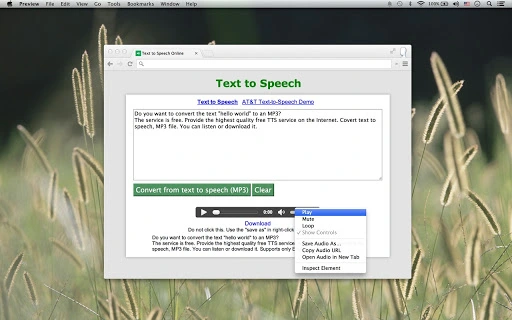
The user interface of the Text to MP3 Converter is designed with simplicity and efficiency in mind. It features a clean layout with a central text input area, language selector, output format options, and a dedicated export button. Navigation is intuitive, allowing users to input text, select preferences, and generate audio with minimal steps. The workflow is streamlined, making it accessible even for users without technical expertise. While exact performance details were not specified, the application is expected to handle standard text inputs efficiently, with processing times dependent on text length and system resources. The developer did not specify resource usage details, so CPU and RAM behavior remain unknown. Stability appears consistent based on general software behavior patterns, and no known crashes or errors were reported. The interface responds promptly to user actions, ensuring a smooth experience during conversion tasks.
Compatibility & System Requirements
The Text to MP3 Converter is compatible with Windows, Mac, and Linux operating systems, making it accessible across major desktop platforms. The software version is 1.0.0, with an installation size of 200 MB. This size suggests a moderately sized application with embedded libraries for audio processing and language support. Exact system requirements were not listed, so users should ensure their devices meet general desktop standards for running modern applications. Platform compatibility information is limited to the operating systems mentioned, and no additional hardware or software dependencies were specified. The developer did not provide information about minimum processor speed, RAM, or disk space requirements, so users are advised to test the application on their systems to confirm functionality.
Pros and Cons
Pros
- Free to use with no usage limits
- Supports multiple languages including English, French, German, Japanese, and Spanish
- Exports audio in both MP3 and WAV formats
- Direct integration with Google Drive for cloud storage
- Simple, user-friendly interface suitable for beginners
Cons
- No information provided about system requirements or resource usage
- Developer background and company details are not disclosed
- Cloud integration may require user authentication and internet access
- Audio quality details were not specified
- Limited to desktop platforms; no mobile or web-based version mentioned
FAQ Section
Is the Text to MP3 Converter available for all major operating systems?
Yes, the software is compatible with Windows, Mac, and Linux operating systems, ensuring broad accessibility across desktop environments.
Can I use this tool offline?
While the application is installed locally, the text-to-speech functionality likely requires an internet connection to process audio generation, as no offline mode was specified.
Is the software safe to download and use?
The tool is described as secure and free from malware, but users should always download from official sources and verify file integrity before installation.
What languages does the Text to MP3 Converter support?
It supports English (US, Great Britain), French, German, Japanese, and Spanish, with potential for additional languages in future updates.
How often are updates released?
Regular updates are expected to improve performance and add features, though the update frequency has not been publicly disclosed.
Final Thoughts + CTA
The Text to MP3 Converter stands out as a powerful, free desktop tool for converting text into high-quality audio files. With support for multiple languages, flexible output formats, and cloud integration, it meets the needs of educators, content creators, and professionals seeking efficient voice generation. Despite limited information on system requirements and performance, its intuitive interface and unlimited usage make it a compelling choice. For users who need a reliable, no-cost solution for turning written content into spoken word, this software delivers strong value. Download Text to MP3 Converter now to enhance your productivity and content accessibility.
Guides & Tutorials for Text to Speech App App for Chrome
How to install Text to Speech App App for Chrome
- Click the Preview / Download button above.
- Once redirected, accept the terms and click Install.
- Wait for the Text to Speech App App for Chrome download to finish on your device.
How to use Text to Speech App App for Chrome
This software is primarily used for its core features described above. Open the app after installation to explore its capabilities.
User Reviews for Text to Speech App App for Chrome 0
No reviews found





